
Last checked: October 22, 2026
A Shopify store health check is a short, regular review that catches problems before they cost you sales. Most store owners only look when something feels wrong, by which time a broken page, a stockout or wasted ad spend has already hurt. This weekly checklist takes about half an hour by hand, and the second half of this guide shows how an AI agent can run much of it for you.
The weekly checklist
1. Sales and conversion
- Compare this week's orders and revenue with last week and the same week last month.
- Check conversion rate for the whole store and for your top products.
- Note any sudden drop and ask what changed: a price, a theme edit, an app update, or an ad campaign.
2. Cart and checkout
- Check the cart abandonment trend. A jump usually points to a checkout problem, an unexpected shipping cost, or a payment method failing.
- Place a test order on mobile and desktop to confirm checkout works.
3. Product page SEO
- Open Google Search Console and look at your top pages. Falling clicks or impressions deserve a closer look.
- Check titles for length and clarity. Titles that are too short or stuffed with keywords tend to underperform.
- Make sure pages have unique descriptions and, where helpful, FAQ content.
4. Stock
- List products at risk of running out, based on how fast they sell and how long a reorder takes.
- Check for items that have not sold in months, since they tie up cash.
5. Ads and traffic
- Review spend against sales for each channel.
- Pause campaigns that spend but do not convert.
- Check which traffic sources send visitors who actually buy.
6. Competitors
- Visit two or three rival stores. Look for price changes, new products and promotions.
7. Site speed and apps
- Test your home and product pages for load speed.
- Remove apps you no longer use, since each one can slow the store.
Turn it into a score
A simple scoring system makes trends easy to see. Give each of the seven areas a rating of good, warning or critical, then record the count each week. Improving the number of critical items over time is a clear sign your store is healthier.
What takes time by hand
The checks are not hard, but together they mean opening many dashboards: Shopify, Search Console, your ad accounts and your stock list. That is why many owners skip weeks.
How an AI agent can automate it
An AI agent connects to your store and ad accounts and runs these checks on a schedule, then lists what needs attention.
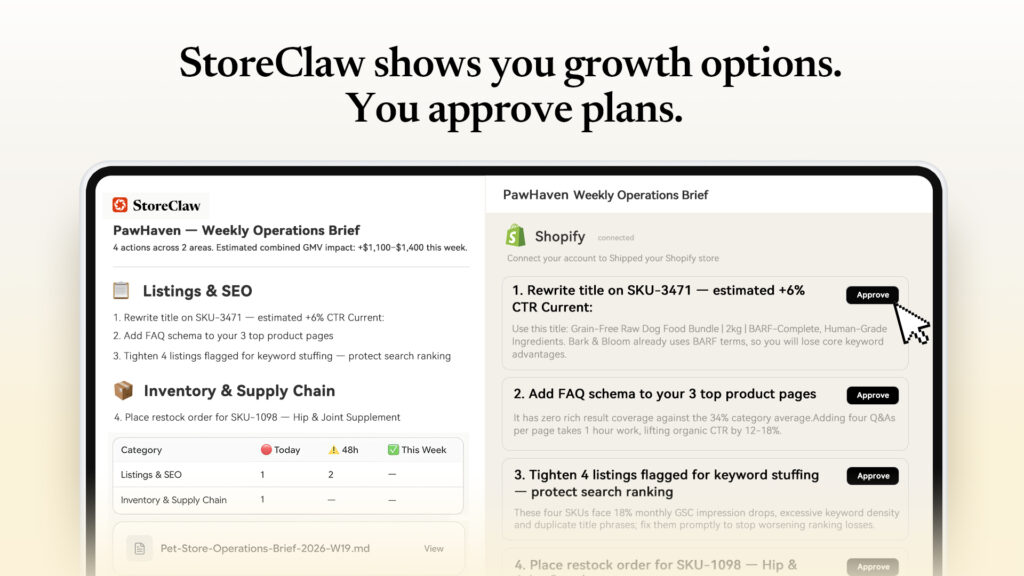
StoreClaw's materials describe a Store Diagnostics module that runs health checks on sales, inventory, ads and traffic. Its demo screenshot shows a store health score out of 100 with issues sorted as critical, warning and info, such as underperforming product titles and rising cart abandonment. It also shows a weekly operations brief with proposed actions that you approve one by one. The store in the demo is fictional, so the numbers are illustrations, not results. We have not run it on a live store, as explained in our StoreClaw review.
What to keep doing yourself
- Read the findings and check them against your own data for the first few weeks.
- Approve changes deliberately, especially to prices and ad budgets.
- Keep your own sense of the brand. A tool can flag a weak title, but you know your customers.
Getting started
Pick one routine, such as the weekly brief, and run it for a month. If you want to try an AI agent for this, StoreClaw has a free plan with 300 signup credits and, according to StoreClaw, no credit card is required. See StoreClaw discounts for Shopify and Amazon sellers for plan details. For a wider introduction, read AI for Shopify sellers.
Frequently asked questions
How often should I run a Shopify store health check? Weekly is a good rhythm for most stores. Check stock and ads more often during busy periods.
What should a store health check include? Sales and conversion, cart and checkout, SEO, stock, ads and traffic, competitors, and site speed.
Can I automate a Shopify store health check? Partly. AI tools can run the checks and flag issues, but you should review the findings and approve changes.
Is there a free way to try an automated health check? Some tools offer free plans. StoreClaw does, with 300 signup credits.

