

Last checked: October 22, 2026
AI for Shopify sellers has moved past chatbots that write product descriptions. A new group of tools, often called AI agents, connect to your store, look at real data and propose or carry out tasks. That sounds useful, but it also raises fair questions: what should you hand over, what should you keep, and how do you avoid breaking a store that already makes money? This guide gives a practical answer.
Chatbot or agent: what is the difference?
A chatbot answers questions you type in. It knows nothing about your store unless you paste data in. An AI agent is connected to your store, so it can read orders, products and traffic, spot patterns and suggest specific changes. Some agents can also make those changes once you approve them.
StoreClaw is one example. It describes itself as an AI agent for online sellers and connects to Shopify, Amazon and other platforms. You can read more in our StoreClaw review.
Jobs an AI agent can do well
These tasks are repetitive, data-heavy and easy to check, which is where AI saves the most time:
- Store health checks. Scanning sales, traffic, cart abandonment and stock on a schedule and flagging what changed.
- Product page SEO. Finding titles that are too short or stuffed with keywords, missing descriptions and pages with no FAQ markup.
- First drafts. Writing title and description variants for you to edit, not publish untouched.
- Competitor watching. Noticing when a rival changes a price or adds a product.
- Social content. Drafting posts from your product data so you are not starting from a blank page.
Jobs to keep for yourself
- Pricing and discounts. A wrong automated price change costs real money. Keep final control.
- Supplier and quality decisions. An AI cannot inspect a sample or negotiate terms.
- Brand voice. AI copy tends to sound generic. Edit so it sounds like your store.
- Customer problems. Refunds, complaints and unusual requests need a person.
- Ad budgets. Let AI point out waste, but approve spend changes yourself.
Risks to plan for
1. Confident mistakes. AI can state wrong product details, such as sizes or materials. Check facts before publishing. 2. Over-optimised copy. Stuffing keywords can hurt rankings rather than help them. 3. Silent changes. An agent that edits your store without a record makes problems hard to trace. 4. Data access. Giving a tool access to orders and customer data is a trust decision. Read what it can see and change.
A simple checklist for choosing a tool
Ask these questions before you connect your store:
- Does it show proposed changes and wait for your approval?
- Can I see a log of what it did and undo it?
- What data does it read, and does it connect through the platform's own authorization rather than asking for a password?
- Is there a free plan so I can test it on a real store first?
- Is the pricing clear, including how credits or usage limits work?
- Can I leave easily and keep my data?
Where StoreClaw fits
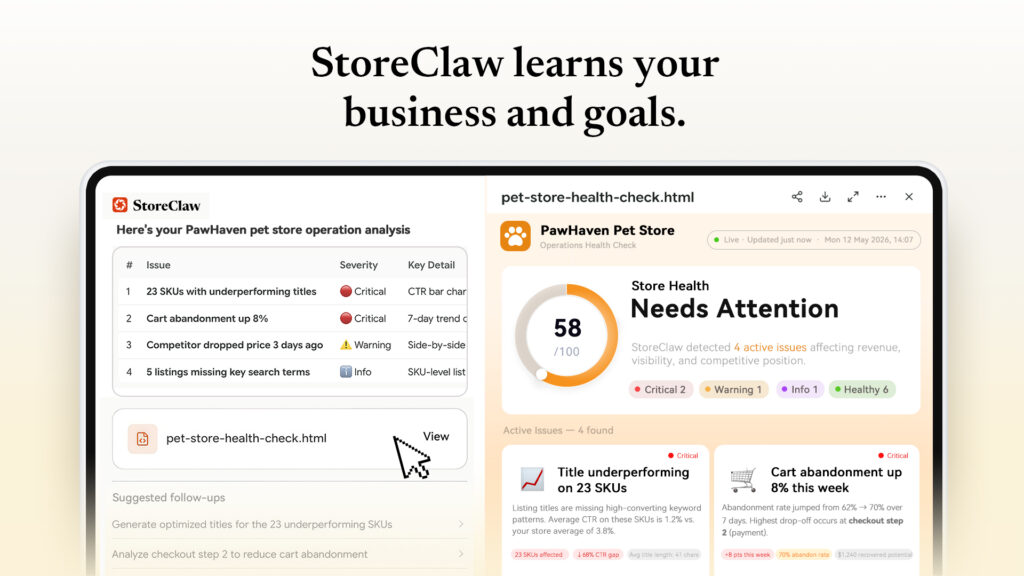
StoreClaw's demo shows a weekly operations brief with numbered actions, such as rewriting a product title or adding FAQ markup to top pages, each with an Approve button. That matches the first item on the checklist. It also offers a free plan with 300 signup credits and, according to StoreClaw, no credit card is needed, so you can test it on a live store before paying. The demo store in its screenshots is fictional, so judge it on your own data. For plans and limits, see our guide to StoreClaw discounts for Shopify and Amazon sellers.
How to start safely
1. Pick one narrow job, such as a weekly store health check, and test only that. 2. Connect a store and review every suggestion before approving it. 3. Compare the AI's findings with your own numbers in Shopify and Google Search Console. 4. Expand to more tasks only after a few weeks of reliable results.
For a ready-made routine, use our Shopify store health check checklist.
Frequently asked questions
What can AI do for a Shopify store? It can run health checks, suggest SEO fixes, draft titles and descriptions, watch competitors and draft social posts. A person should approve anything that goes live.
Will AI replace my store management? No. It handles repetitive checks and drafts, while pricing, suppliers, brand and customer decisions stay with you.
Is it safe to connect an AI tool to my store? It can be, if the tool uses the platform's official authorization, shows changes before applying them and keeps a log. Read what permissions it asks for.
Do I need to pay to try an AI agent? Not always. Some, including StoreClaw, offer a free plan, so you can test one job before committing.

