

Let’s be honest for a second. Choosing between Hostinger vs Cloudways feels a bit like choosing between an automatic sedan and a manual sports car.
Both will get you from point A to point B. But the experience? Completely different.
I’ve actually used both hosting providers for my own projects. In this detailed Hostinger vs Cloudways comparison, I’m not just going to throw tech jargon at you. I’m going to tell you the real-world truth about which one is actually worth your money in 2026.
⚡ The “Too Long; Didn’t Read” Verdict
If you are in a rush, here is the quick summary:
- 🌱 Are you a Beginner / Blogger? Go with Hostinger. It is a shared hosting provider that is cheap, includes a free domain & email, and is super easy to use.
- 🚀 Are you a Business / eCommerce? Go with Cloudways. It is a managed cloud hosting platform that is faster, handles high traffic better, and offers monthly billing.
1. Hostinger vs Cloudways: The Core Difference
Before we look at the speed tests, let me explain the core difference between Hostinger vs Cloudways in simple English.
Imagine Hostinger is like living in a big Apartment Building (Shared Hosting). You have your own flat, but you share the water, electricity, and elevator with 500 other neighbors. If your neighbor throws a huge party (gets lots of traffic), your lights might flicker (your site slows down). But hey, the rent is super cheap!
Cloudways, on the other hand, is like renting a Private Villa (Managed Cloud). You have your own dedicated resources. No noisy neighbors. It costs a bit more, and you might have to change your own lightbulbs sometimes, but the performance is unmatched.
2. Hostinger vs Cloudways Performance: Which is Faster? 🏎️
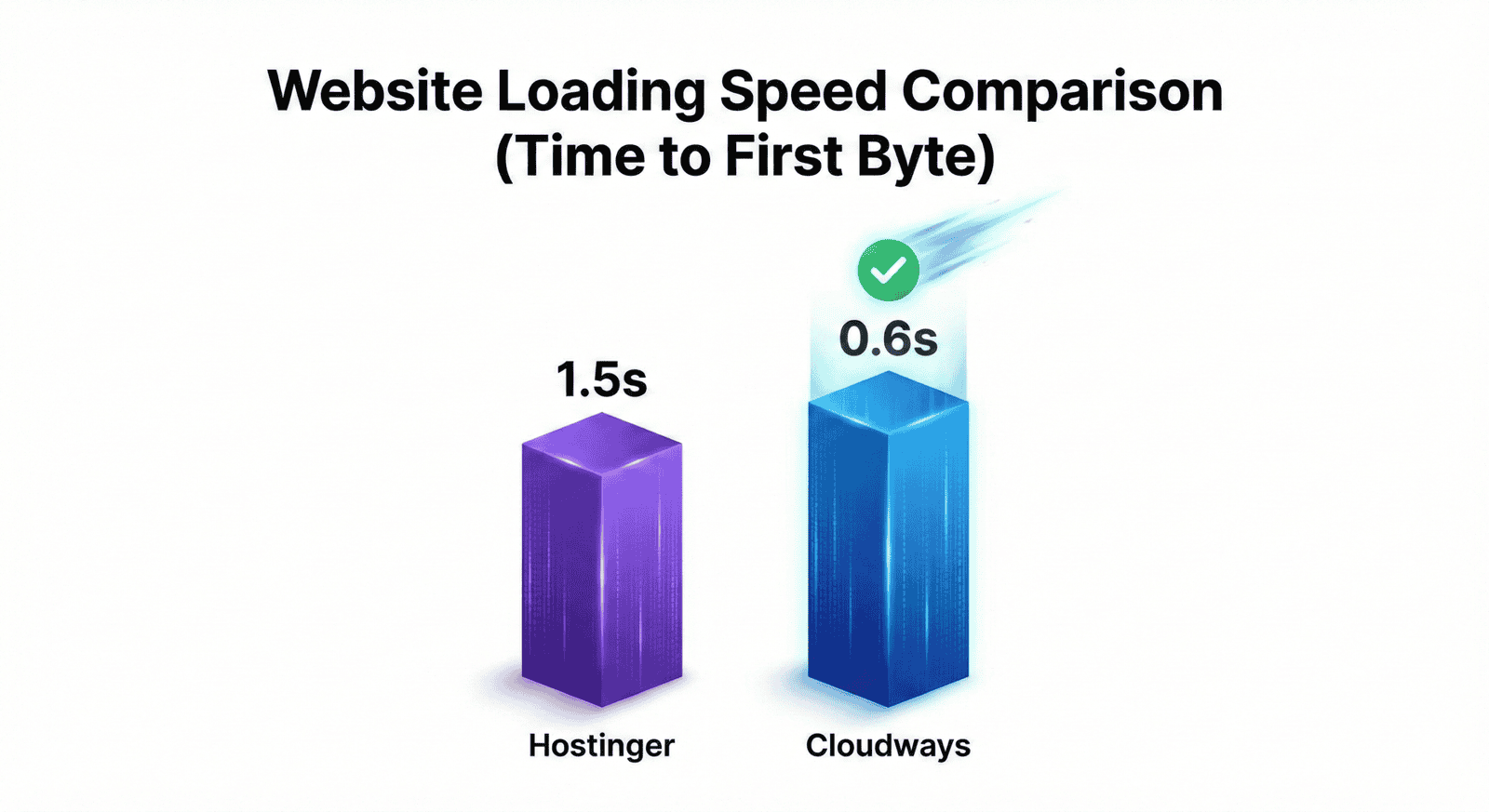
I installed a heavy WordPress theme on both platforms to see who wins the Hostinger vs Cloudways speed battle. Site speed is critical because 53% of mobile users leave a site if it takes longer than 3 seconds to load.
Hostinger Speed
Hostinger surprised me. For a “shared” host, it’s actually pretty snappy thanks to their LiteSpeed Web Servers. My test site loaded in about 1.5 seconds. For a new blog, this is perfectly fine. They also offer built-in Object Cache for WordPress, which helps reduce database queries.
Cloudways Speed
Cloudways is on another level. Since I used their “DigitalOcean” server, my test site loaded in 0.6 seconds. That’s nearly instant. They use a proprietary technology called “ThunderStack,” which combines Nginx, Varnish, Redis, and Apache. If you are running an online store (WooCommerce), this speed difference equals more sales.
3. Hostinger vs Cloudways Security Features 🔒
Security is non-negotiable. Let’s see how they protect your data in this Hostinger vs Cloudways security face-off.
Hostinger includes unlimited free SSL certificates, a native firewall, and Cloudflare integration out of the box. They also use BitNinja security on their servers to block automated DDoS attacks. For beginners, this hands-off approach is great because everything is pre-configured.
Cloudways takes security seriously with OS-level firewalls, free Let’s Encrypt SSL, and IP whitelisting. They also have a feature called “Bot Protection” powered by MalCare, which blocks brute-force attacks on your WordPress login page.
4. Ease of Use (The “Headache” Test) 🤯
Hostinger (Smooth Sailing)
Logging into Hostinger feels like using an iPhone. Everything is where you expect it to be. You want to install WordPress? Click one button. Need a professional email? Click another button. It is designed for people who hate coding. Their hPanel is widely considered one of the best control panels in the industry.
Cloudways (For the Geeks)
Cloudways looks a bit more like a cockpit. It’s powerful, but you see buttons like “SSH Access,” “Cron Jobs,” and “Staging.” It’s not hard, but if you’ve never built a website before, you might feel a little lost for the first hour. However, once you learn it, you have total control over your server management.
5. The Price Tag Reality 💸
This is where the Hostinger vs Cloudways pricing battle gets interesting. Let’s look at the real numbers.
| Feature | Hostinger | Cloudways |
|---|---|---|
| Starting Price | $2.99/mo (Cheap!) | ~$11.00/mo (Fair) |
| The Catch | You must pay for 48 months upfront. | None. You pay monthly. |
| Free Domain? | ✅ Yes (Save ~$15) | ❌ No |
| Money-Back Guarantee | 30 Days | 3 Days (Trial) |
My take: If you have $150 in your pocket right now, pay Hostinger for 4 years and forget about bills. If you prefer paying small amounts monthly, Cloudways is better.
6. Hostinger vs Cloudways: Pros & Cons
To summarize this detailed Hostinger vs Cloudways review, here is a quick breakdown of their strengths and weaknesses.
✅ The Good Stuff:
- Insanely cheap (less than a coffee/mo).
- You get a Free Domain & SSL.
- Free professional email included.
- Super beginner-friendly dashboard.
❌ The Bad Stuff:
- Renewal prices are higher.
- Speed can drop if you get viral traffic.
✅ The Good Stuff:
- Blazing fast speed (Google Cloud/AWS/DigitalOcean).
- Dedicated resources (Site won’t crash).
- Pay-as-you-go (No contracts).
- One-click server scaling & Staging.
❌ The Bad Stuff:
- No email hosting included.
- Slight learning curve for newbies.
7. Final Verdict: Who Wins the Battle? 🤔
Okay, let’s wrap this up. Making the wrong choice can be frustrating, so I have broken this Hostinger vs Cloudways decision down by “User Type” to help you decide.
Choose Hostinger if…
- You are a New Blogger: You need everything (Domain + Hosting + Email) in one affordable package.
- You are on a Budget: You want to pay ~$3/month and not worry about technical server management.
- You run a Small Business Site: A simple 5-page website for a restaurant, gym, or portfolio will run perfectly on Hostinger.
Choose Cloudways if…
- You are an eCommerce Store Owner: WooCommerce needs power. Cloudways handles checkouts and product pages much faster.
- You are an Agency or Freelancer: You can manage multiple client servers from one dashboard and even clone servers in one click.
- You have High Traffic: If your blog gets over 50,000 visitors, Hostinger shared plans might struggle, but Cloudways won’t even blink.
8. Frequently Asked Questions
Is Cloudways faster than Hostinger?
Yes, absolutely. Cloudways uses dedicated cloud servers and advanced caching stacks, making it significantly faster than Hostinger’s shared plans.
Can I move from Hostinger to Cloudways later?
Yes! Cloudways offers a free migration plugin. You can start with Hostinger to save money, and once your site grows, move to Cloudways easily without any downtime.
Does Cloudways come with cPanel?
No, Cloudways uses its own custom control panel which is cleaner and more modern than cPanel. However, Hostinger uses hPanel, which is very similar to cPanel but more user-friendly.
